LiquidManzana Exchange Settings - Profile Overview
 LiquidManzana Exchange Settings - Profile Overview
LiquidManzana Settings Page
Profile Tab
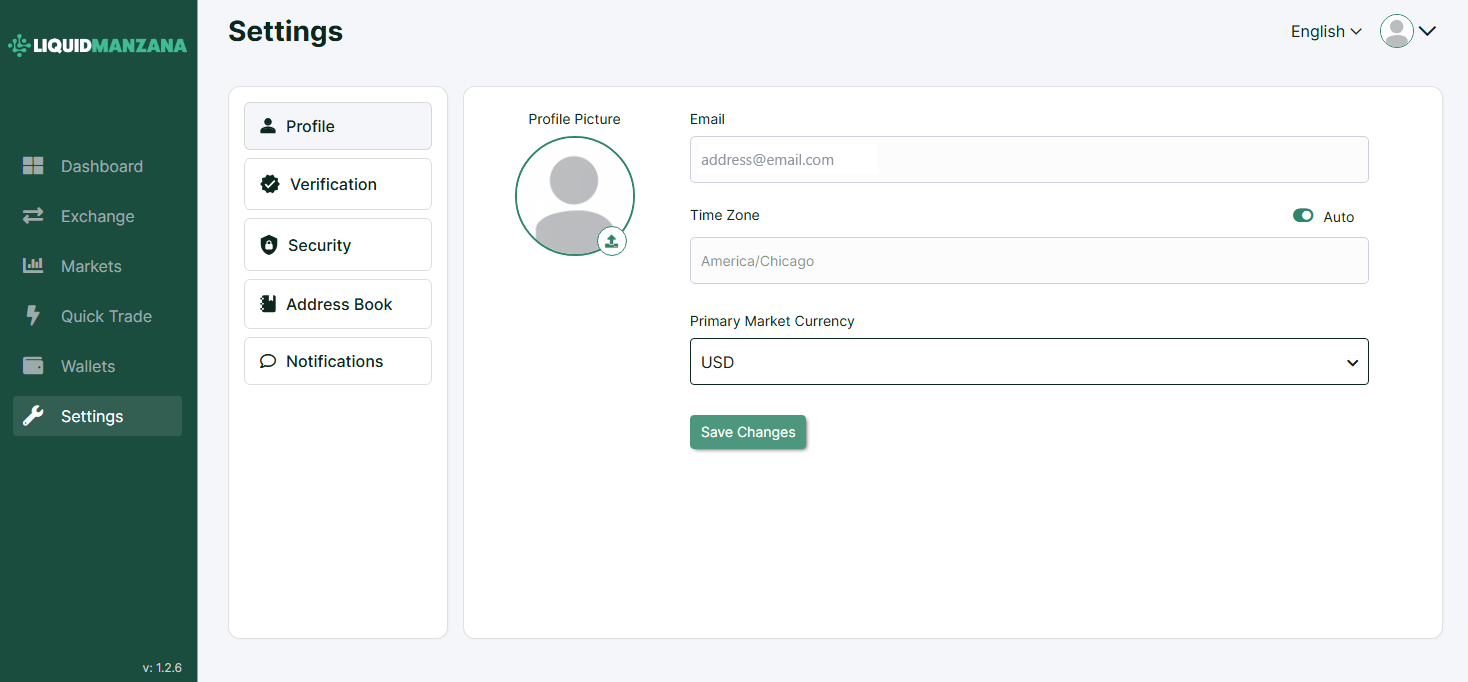
The Profile tab within the Settings section enables users to manage basic personal information, time zone preferences, and default trading currency.
Profile Interface Breakdown
Profile Picture Upload
Placeholder avatar with upload icon
Clicking the upload icon allows the user to set or change their profile picture
Text field for the user's email address
This field is likely non-editable once set during registration (depending on backend rules)
Time Zone
Input field for setting preferred time zone (e.g., America/Chicago)
Toggle to enable Auto detection of time zone based on location or system settings
Primary Market Currency
Dropdown menu to select the default market display currency
Example: USD selected
Save Button
Button labeled Save Changes
Applies any changes made to the profile information or settings
Sidebar Navigation
The left-hand settings menu contains the following tabs:
Profile (current tab)
Verification - KYC and identity validation
Security - Manage 2FA, password, and other protections
Address Book - Store wallet addresses for recurring use
Notifications - Customize system alerts and emails
Sidebar (Main Navigation)
Persistent sidebar gives quick access to core exchange functions:
Dashboard
Exchange
Markets
Quick Trade
Wallets
Settings (current section)
Version number shown: v: 1.2.6
Summary
The Profile tab in LiquidManzana’s Settings section is designed to give users control over:
Their basic account identity
Time zone preferences
Default fiat denomination used across trading pairs
This configuration enhances localization, usability, and clarity throughout the platform.
Related Articles
LiquidManzana Exchange Settings - Notifications Overview
LiquidManzana Exchange Settings - Notifications Overview LiquidManzana Settings Page Notifications Tab The Notifications tab allows users to manage email alerts for various account activities. These settings ensure that users stay informed about ...LiquidManzana Exchange Settings - Verification Overview
LiquidManzana Exchange Settings - Verification Overview LiquidManzana Settings Page Verification Tab The Verification tab within the Settings section allows users to verify their account in order to access the full range of exchange services in ...LiquidManzana Exchange Settings - Security Overview
LiquidManzana Exchange Settings - Security Overview LiquidManzana Settings Page Security Tab The Security section allows users to enhance account protection and manage critical security settings. 1. Anti-Phishing Code Purpose: Add a custom ...LiquidManzana Exchange Settings - Address Book Overview
LiquidManzana Exchange Settings - Address Book Overview LiquidManzana Settings Page Address Book Tab The Address Book section is designed to manage external wallet addresses for both crypto and fiat transactions. Address Book Sections 1. Crypto ...LiquidManzana Exchange - Dashboard Overview
LiquidManzana Exchange - Dashboard Overview LiquidManzana Exchange Dashboard Dashboard Overview Welcome to LiquidManzana – Your Crypto Exchange & RWA Tokenization Platform The dashboard provides users with a comprehensive overview of their trading ...