LiquidManzana Exchange - Dashboard Overview
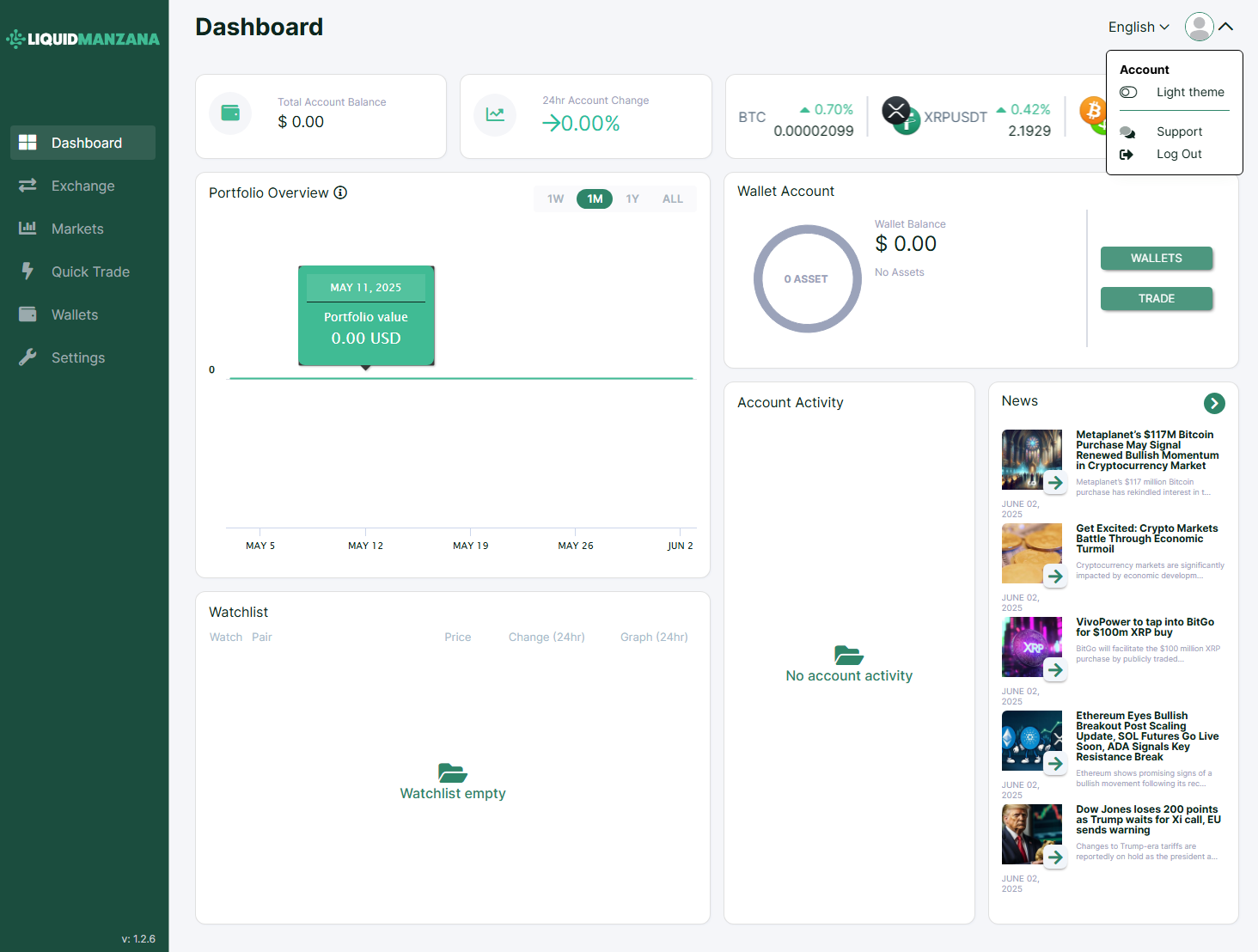 LiquidManzana Exchange - Dashboard Overview
LiquidManzana Exchange Dashboard
Dashboard Overview
Welcome to LiquidManzana – Your Crypto Exchange & RWA Tokenization Platform
The dashboard provides users with a comprehensive overview of their trading activity, portfolio performance, account status, and market news. Here's a breakdown of the interface:
Top Tiles: Key Account Metrics
Total Account Balance
Displays the user’s total holdings across all assets in USD.
Example: $0.00
24hr Account Change
Percentage change in portfolio value over the past 24 hours.
Example: +0.00%
Market Tickers
Real-time updates of selected asset pairs:
BTC
XRPUSDT
Each shows:Percentage change
Last price
Portfolio Overview Chart
An interactive time-based graph representing portfolio value over time:
Time filters available:
1W (1 Week)
1M (1 Month)
1Y (1 Year)
ALL (All Time)
Tooltip popups on hover show:
Date (e.g., May 11, 2025)
Portfolio value (e.g., 0.00 USD)
Wallet Account Panel
Circular graph with asset count
(e.g., 0 ASSET)Wallet Balance: 0.00 USD
No active assets message
Quick action buttons:
WALLETS
TRADE
Account Activity Section
Displays recent account actions (deposits, withdrawals, trades).
When inactive, shows message:
No account activity
Watchlist Panel
Custom list of tracked trading pairs
Shows:
Pair
Price
24hr Change
Graph
If empty:
Watchlist empty
News Feed Panel
Provides curated news articles relevant to crypto and market trends:
Example headlines:
"Metaplanet's $117M Bitcoin Purchase May Signal Renewed Bullish Momentum"
"Get Excited: Crypto Markets Battle Through Economic Turmoil"
"Ethereum Eyes Bullish Breakout Post Scaling Update"
Each article includes:
Thumbnail image
Headline
Summary snippet
Date (e.g., June 02, 2025)
Sidebar Navigation
Left-hand vertical menu for key pages:
Dashboard – Current view
Exchange – Full trading interface
Markets – Live asset prices and pairs
Quick Trade – Fast buy/sell option
Wallets – Manage balances and funding
Settings – Security and profile management
Header Controls
Top-right dropdown under user icon:
Light Theme – Theme toggle
Support – Access help resources
Log Out – Sign out of the platform
Footer
Bottom-left versioning info:
v: 1.2.6
Summary
The LiquidManzana Exchange Dashboard is built for:
Clear insight into total balances and performance
Real-time market tracking
Convenient navigation and wallet access
Informative news feed for market context
LiquidManzana's dashboard is a modern, all-in-one interface designed to streamline user engagement with crypto trading and RWA-backed assets.
Related Articles
LiquidManzana Exchange - Wallets Overview
LiquidManzana Exchange - Wallets Overview LiquidManzana Wallets Page Overview The Wallets page provides a comprehensive summary of all the cryptocurrencies and fiat currencies held in a user’s account on the LiquidManzana exchange. This interface ...LiquidManzana Exchange - Overview
LiquidManzana Exchange - Overview LiquidManzana Exchange Interface Exchange Overview The LiquidManzana Exchange screen is a full-featured cryptocurrency trading interface where users can place trades, monitor price charts, review order books, and ...LiquidManzana Exchange - Markets Overview
LiquidManzana Exchange - Markets Overview LiquidManzana Markets Page Overview The Markets page in LiquidManzana provides a comprehensive snapshot of all supported cryptocurrency trading pairs, allowing users to quickly compare prices, percentage ...LiquidManzana Exchange Settings - Notifications Overview
LiquidManzana Exchange Settings - Notifications Overview LiquidManzana Settings Page Notifications Tab The Notifications tab allows users to manage email alerts for various account activities. These settings ensure that users stay informed about ...LiquidManzana Exchange Settings - Verification Overview
LiquidManzana Exchange Settings - Verification Overview LiquidManzana Settings Page Verification Tab The Verification tab within the Settings section allows users to verify their account in order to access the full range of exchange services in ...