LiquidManzana Exchange - Wallets Overview
 LiquidManzana Exchange - Wallets Overview
LiquidManzana Wallets Page
Overview
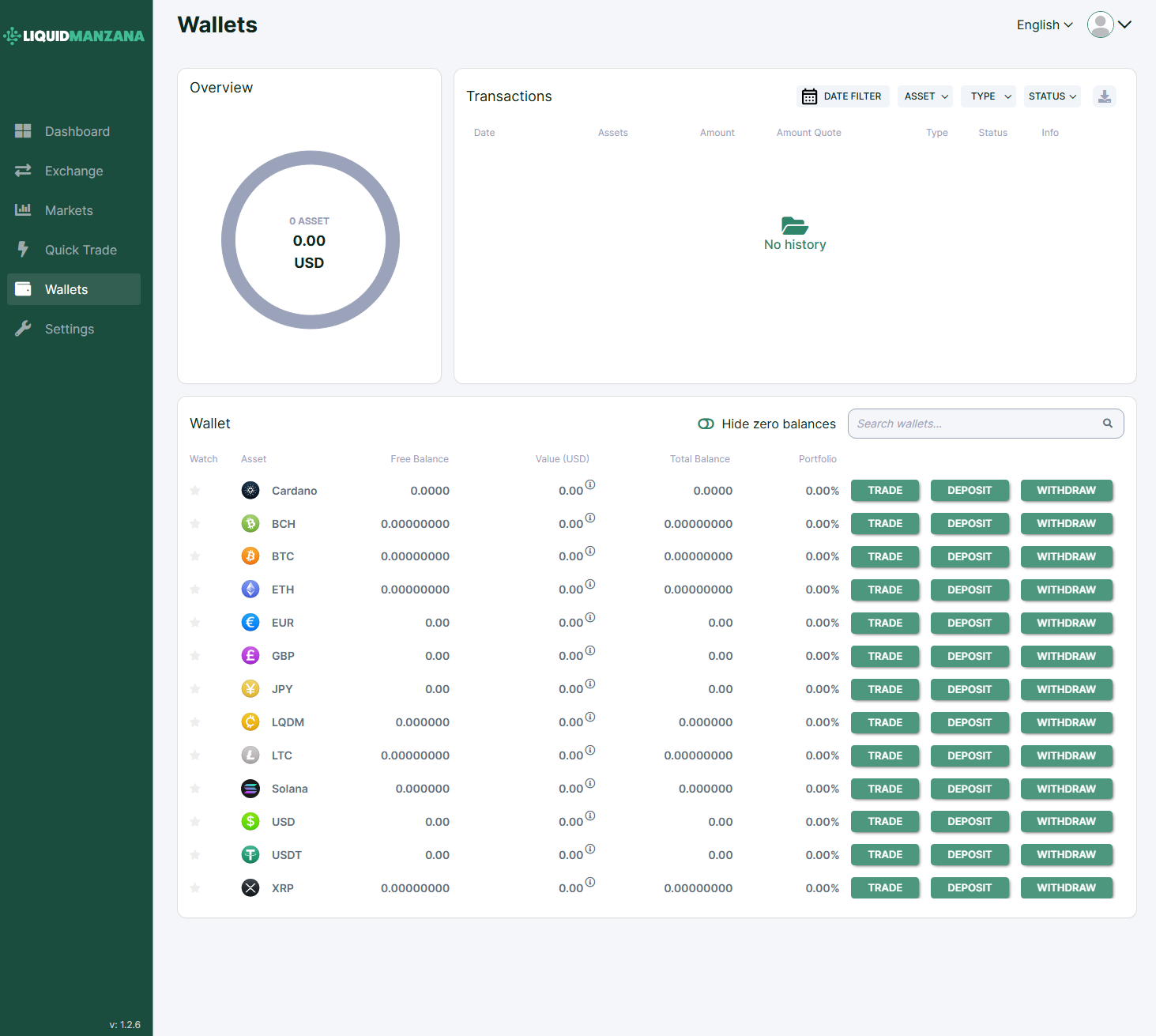
The Wallets page provides a comprehensive summary of all the cryptocurrencies and fiat currencies held in a user’s account on the LiquidManzana exchange. This interface supports balance visibility, deposit/withdrawal actions, and transaction history review.
Wallets Interface Breakdown
The interface is divided into three main sections:
1. Overview (Top Left)
Displays the total wallet balance in USD across all assets.
Circle chart shows visual representation of asset distribution.
Displays total number of asset types (e.g., "0 Asset").
2. Transactions (Top Right)
Transaction History Panel shows user activity.
If no transactions have occurred, a placeholder is shown:
“No history”.
Filter Options:
Date Filter
Asset
Type (Deposit, Withdraw, Trade)
Status (Completed, Pending, etc.)
Download Icon to export transaction data
3. Wallet Table (Bottom)
Columns:
Example Assets Shown:
Cardano
BCH (Bitcoin Cash)
BTC (Bitcoin)
ETH (Ethereum)
EUR (Euro)
GBP (British Pound)
JPY (Japanese Yen)
LQDM (LiquidManzana Token)
LTC (Litecoin)
Solana
USD (US Dollar)
USDT (Tether)
XRP (Ripple)
Each has a Trade, Deposit, and Withdraw button for fast interaction.
Utility Controls
Hide Zero Balances Toggle:
Filters out assets with 0 balance to declutter the interface.
Search Bar:
Allows quick filtering by asset name or symbol.
Sidebar Navigation
Persistent on the left side, the menu provides quick access to:
Dashboard
Exchange
Markets
Quick Trade
Wallets (current view)
Settings
Version:
v: 1.2.6 displayed at the bottom left.
Summary
The Wallets page is built for clarity and action. It emphasizes:
Fast access to trade/deposit/withdraw per asset
Real-time asset valuation and portfolio share
Efficient filtering and searching
Streamlined transaction tracking
This interface supports proactive portfolio management for novice and experienced users alike.
Related Articles
LiquidManzana Exchange - Dashboard Overview
LiquidManzana Exchange - Dashboard Overview LiquidManzana Exchange Dashboard Dashboard Overview Welcome to LiquidManzana – Your Crypto Exchange & RWA Tokenization Platform The dashboard provides users with a comprehensive overview of their trading ...LiquidManzana Exchange Settings - Address Book Overview
LiquidManzana Exchange Settings - Address Book Overview LiquidManzana Settings Page Address Book Tab The Address Book section is designed to manage external wallet addresses for both crypto and fiat transactions. Address Book Sections 1. Crypto ...LiquidManzana Exchange Settings - Profile Overview
LiquidManzana Exchange Settings - Profile Overview LiquidManzana Settings Page Profile Tab The Profile tab within the Settings section enables users to manage basic personal information, time zone preferences, and default trading currency. Profile ...LiquidManzana NFT Marketplace - Wallets and Payment Methods
LiquidManzana NFT Marketplace Wallets and Payment Methods "Add, edit, and remove payment methods and wallets from your LiquidManzana account." This page is the financial hub of your digital real estate experience — where assets enter and exit the ...LiquidManzana Exchange - Overview
LiquidManzana Exchange - Overview LiquidManzana Exchange Interface Exchange Overview The LiquidManzana Exchange screen is a full-featured cryptocurrency trading interface where users can place trades, monitor price charts, review order books, and ...