LiquidManzana Exchange - Overview
 LiquidManzana Exchange - Overview
LiquidManzana Exchange Interface
Exchange Overview
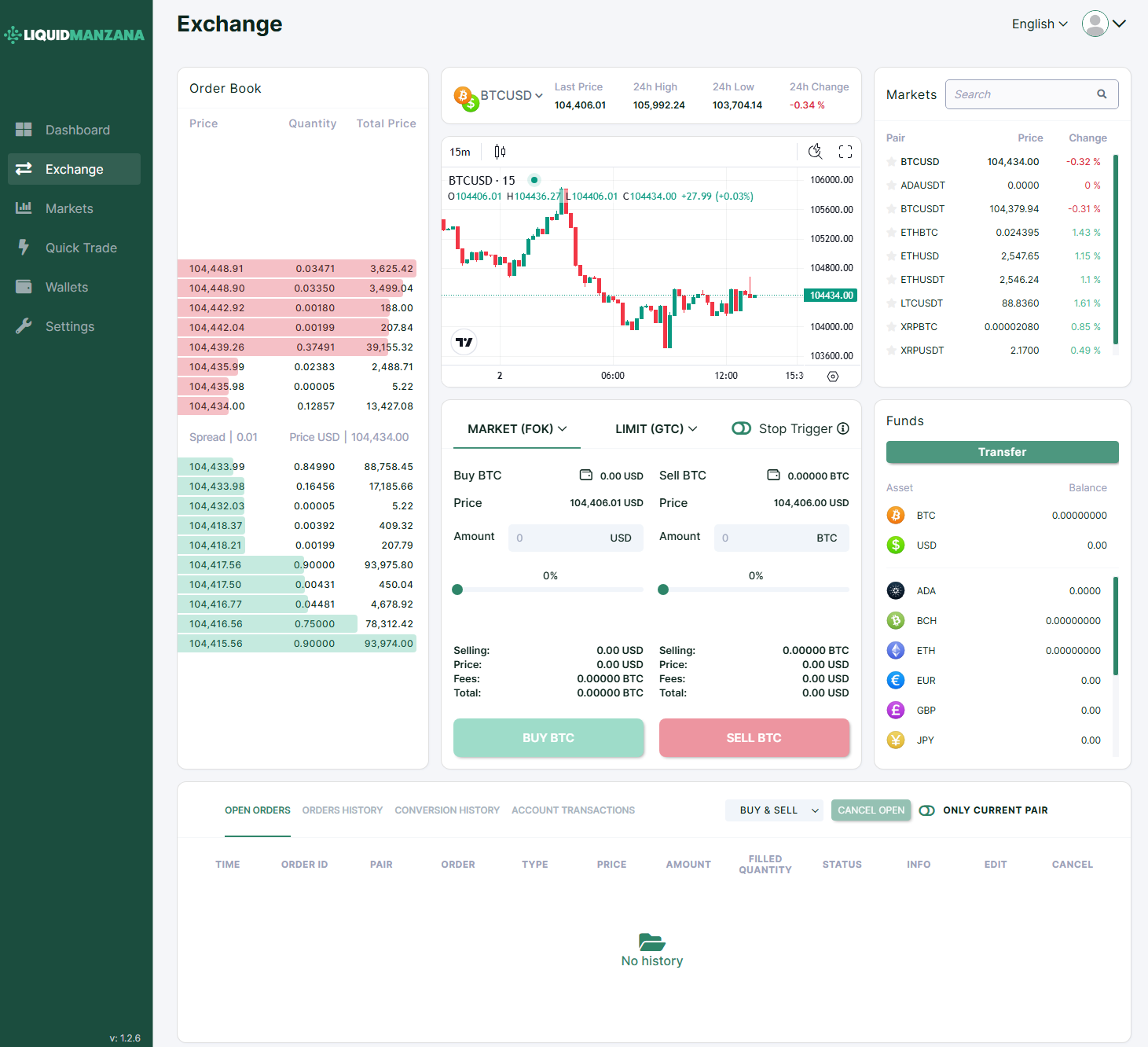
The LiquidManzana Exchange screen is a full-featured cryptocurrency trading interface where users can place trades, monitor price charts, review order books, and track market performance in real-time.
Left Column: Order Book
Displays live buy and sell orders for the selected pair (BTCUSD in this case):
Price (USD) – Current market prices for bids and asks
Quantity (BTC) – Volume at each price level
Total Price – Cumulative value of each row
Spread: Shown between the lowest ask and highest bid
Example: 0.01
Current price shown: 104,434.00
Center Panel: Chart & Trade Module
Trading Chart
Pair: BTCUSD
Timeframe Selector: 15m, 1H, etc.
Last Price: 104,406.01
24h High: 105,992.24
24h Low: 103,704.14
24h Change: -0.34%
Interactive TradingView-style candlestick chart
Zoom and scroll capabilities
Price crosshair overlay
Trade Execution Module
Two order types:
Market (FOK)
Limit (GTC)
Fields:
Buy BTC: Enter USD to buy
Sell BTC: Enter BTC to sell
Stop Trigger: Optional toggle
Real-time price and total calculations
Progress bars show % of available balance being used
Action buttons:
BUY BTC (green)
SELL BTC (red)
Right Column: Markets & Funds
Markets Panel
Shows price and daily change for selected trading pairs:
Funds Panel
Displays asset balances for the logged-in user:
Assets Tracked:
BTC
USD
ADA
BCH
ETH
EUR
GBP
JPY
Transfer Button: Quick deposit/withdraw actions
Bottom Panel: Order History
Tabbed section with views for:
Open Orders
Orders History
Conversion History
Account Transactions
Each row (when active) shows:
Time
Order ID
Pair
Order Type
Price
Amount
Filled Quantity
Status
Info
Edit / Cancel options
Filter toggles available:
Buy & Sell
Cancel Open
Only Current Pair
Empty state message:
"No history"
Sidebar Navigation
Left-hand menu includes:
Dashboard – Portfolio overview
Exchange – Current view
Markets – Full asset list with filters
Quick Trade – Simplified buy/sell flow
Wallets – Asset management
Settings – Security, notifications, verification
Footer
Version info shown in the bottom-left:
v: 1.2.6
Summary
The LiquidManzana Exchange page is a robust and intuitive crypto trading interface offering:
Live market and order book data
Real-time trading chart
Market and limit order options
User fund visibility and order management
Responsive design and easy navigation
Ideal for beginner and advanced users managing real-time crypto trades and monitoring market movements.
Related Articles
LiquidManzana Exchange - Wallets Overview
LiquidManzana Exchange - Wallets Overview LiquidManzana Wallets Page Overview The Wallets page provides a comprehensive summary of all the cryptocurrencies and fiat currencies held in a user’s account on the LiquidManzana exchange. This interface ...LiquidManzana Exchange - Markets Overview
LiquidManzana Exchange - Markets Overview LiquidManzana Markets Page Overview The Markets page in LiquidManzana provides a comprehensive snapshot of all supported cryptocurrency trading pairs, allowing users to quickly compare prices, percentage ...LiquidManzana Exchange - Dashboard Overview
LiquidManzana Exchange - Dashboard Overview LiquidManzana Exchange Dashboard Dashboard Overview Welcome to LiquidManzana – Your Crypto Exchange & RWA Tokenization Platform The dashboard provides users with a comprehensive overview of their trading ...LiquidManzana Exchange Settings - Notifications Overview
LiquidManzana Exchange Settings - Notifications Overview LiquidManzana Settings Page Notifications Tab The Notifications tab allows users to manage email alerts for various account activities. These settings ensure that users stay informed about ...LiquidManzana Exchange Settings - Verification Overview
LiquidManzana Exchange Settings - Verification Overview LiquidManzana Settings Page Verification Tab The Verification tab within the Settings section allows users to verify their account in order to access the full range of exchange services in ...