LiquidManzana Exchange - Markets Overview
 LiquidManzana Exchange - Markets Overview
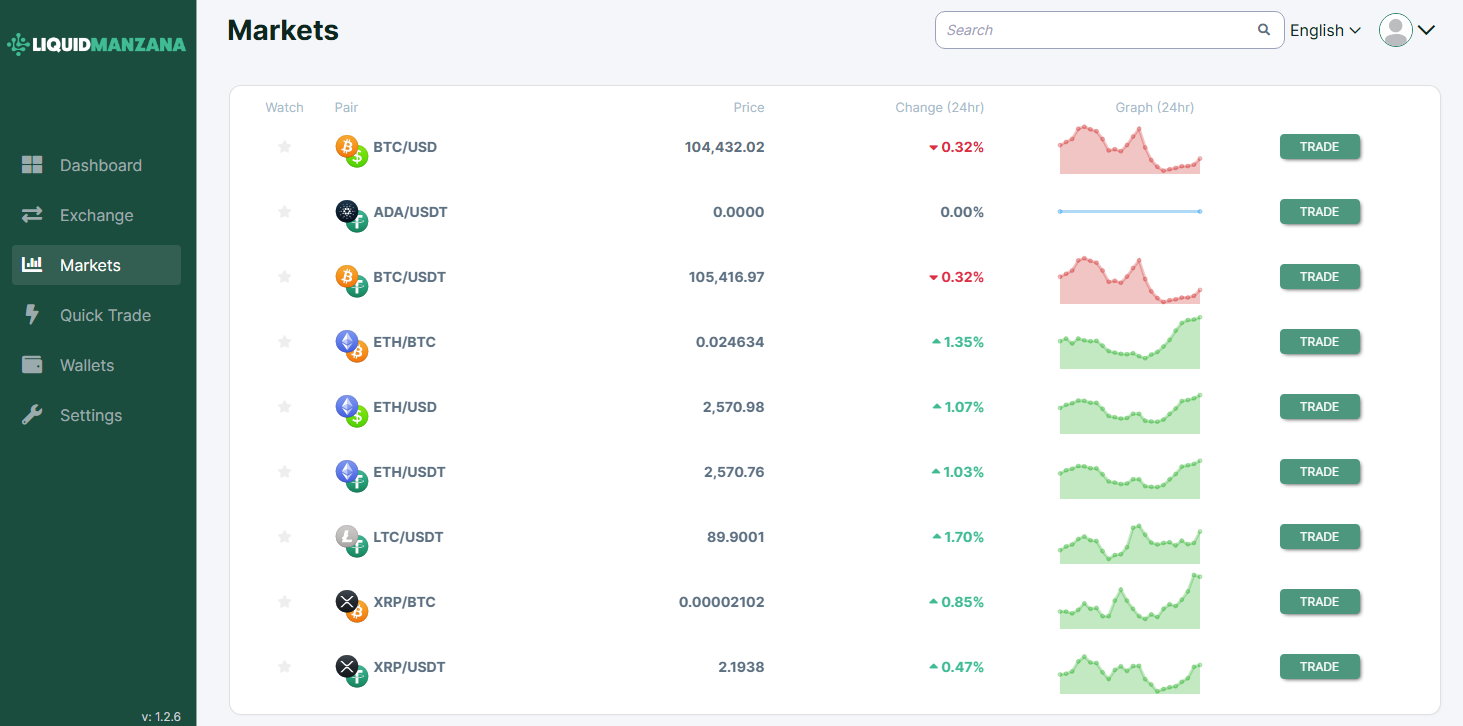
LiquidManzana Markets Page
Overview
The Markets page in LiquidManzana provides a comprehensive snapshot of all supported cryptocurrency trading pairs, allowing users to quickly compare prices, percentage changes, and short-term performance trends over a 24-hour period.
Markets Table Structure
The core of the page is a sortable list of market pairs, displaying five key columns:
Watch
Star icon to favorite specific pairs for easy access in other views.
Pair
Displays the trading pair in the format BASE/QUOTE (e.g., BTC/USDT).
Accompanied by asset logos for visual recognition.
Price
Live market price for the pair.
Example: BTC/USDT → 105,416.97
Change (24hr)
Percentage change over the last 24 hours.
Red for negative, green for positive.
Example: BTC/USDT → -0.32%, ETH/BTC → +1.35%
Graph (24hr)
Miniature sparkline chart illustrating 24-hour trend.
Visual cue for quick trend recognition:
Downtrend = red area
Uptrend = green area
Trade Button
Green button aligned with each row to quickly initiate a trade for the selected pair.
Sample Trading Pairs (as displayed)
Top Navigation
Search Bar:
Located in the top-right corner to quickly find specific trading pairs.
Language Selector:
Default set to "English" with dropdown for localization.
User Menu:
Includes access to account settings and log out options.
Sidebar Navigation
Persistent menu located on the left-hand side:
Dashboard – Portfolio and account summary
Exchange – Trading view with order book and charts
Markets – Current view
Quick Trade – Simplified trading interface
Wallets – View and manage crypto balances
Settings – Update preferences, security, and notifications
Version information shown at the bottom left:
v: 1.2.6
Summary
The Markets screen provides users with:
Instant insights into top trading pairs
A clean, responsive layout with mini trend charts
Easy-to-access trade buttons per pair
The ability to search, favorite, and compare assets in real-time
This interface is ideal for day traders, swing traders, and long-term investors monitoring short-term market volatility or looking for entry points into new positions.
Related Articles
LiquidManzana Exchange - Wallets Overview
LiquidManzana Exchange - Wallets Overview LiquidManzana Wallets Page Overview The Wallets page provides a comprehensive summary of all the cryptocurrencies and fiat currencies held in a user’s account on the LiquidManzana exchange. This interface ...LiquidManzana Exchange - Overview
LiquidManzana Exchange - Overview LiquidManzana Exchange Interface Exchange Overview The LiquidManzana Exchange screen is a full-featured cryptocurrency trading interface where users can place trades, monitor price charts, review order books, and ...LiquidManzana Exchange - Dashboard Overview
LiquidManzana Exchange - Dashboard Overview LiquidManzana Exchange Dashboard Dashboard Overview Welcome to LiquidManzana – Your Crypto Exchange & RWA Tokenization Platform The dashboard provides users with a comprehensive overview of their trading ...LiquidManzana Exchange Settings - Notifications Overview
LiquidManzana Exchange Settings - Notifications Overview LiquidManzana Settings Page Notifications Tab The Notifications tab allows users to manage email alerts for various account activities. These settings ensure that users stay informed about ...LiquidManzana Exchange Settings - Verification Overview
LiquidManzana Exchange Settings - Verification Overview LiquidManzana Settings Page Verification Tab The Verification tab within the Settings section allows users to verify their account in order to access the full range of exchange services in ...